This Topic was Recently Updated.
When we are building projects, two of the most important types of data that we need to keep track of are budgeted and actual cost values.
In FastTrack Schedule 10:
- Use the Cost Layout to input a budget and automatically calculate actual costs.
- Create calculations to pinpoint tasks that are over budget within our projects.Identify the amount a task is over budget.
- Make a column automatically display whether a task is over budget.
- Make a label automatically appear on an activity bar to make a over-budget task more noticeable in the Timeline Graph.
Use the Cost Layout to input a budget and automatically calculate actual costs.
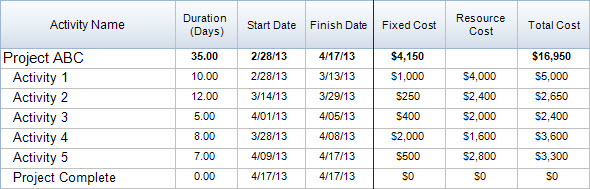
To display a project’s task costs, use the Cost Layout. This will display cost information for Fixed Cost, Resource Cost, and Total Cost.
- Fixed Cost is any cost not directly relating to our resources.
- Resource Cost is calculated based on the resources assigned cost rates and the number of hours they are assigned to tasks.
- Total Cost is the combination of Fixed Cost and Resource Cost.
Notice that in the Cost Layout there is no column for Budget values. We can easily create this on our own.
Continue reading “Using Calculations to Find Cost Variance”